Linuxbeast Developer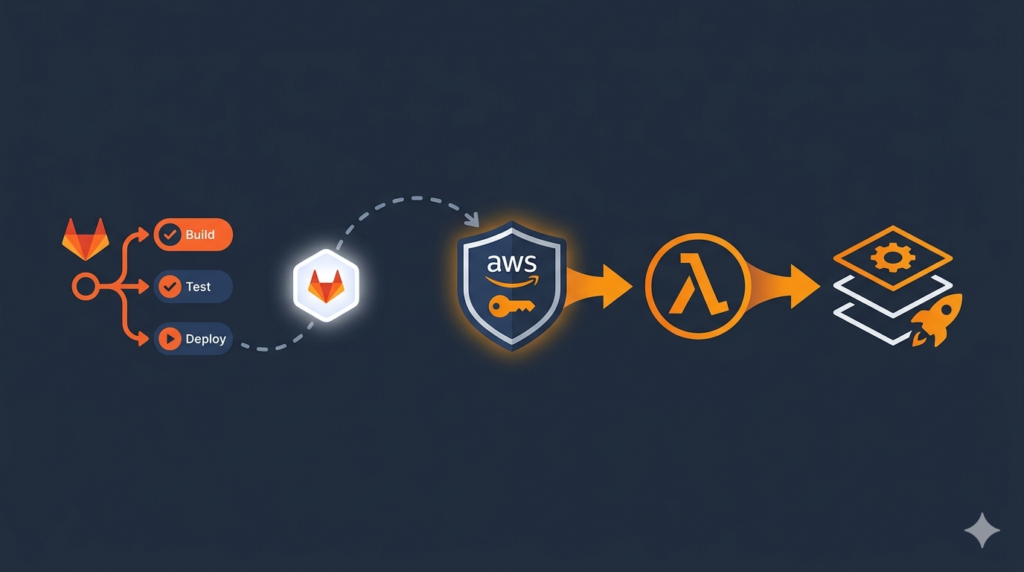
This guide walks through deploying an AWS Lambda + API Gateway service using AWS SAM with a GitLab CI/CD pipeline that authenticates to AWS via OIDC. No long-lived AWS access keys, no Serverless Framework, and a clean multi-account flow for QA, UAT, and PROD.
The local examples in this guide are run on WSL2 Ubuntu in Windows, but they work the same on any Ubuntu system.
Why AWS SAM Over Serverless Framework
Serverless Framework v3 was deprecated in November 2024, and v4 moved to a paid license. AWS SAM is free, Apache 2.0 licensed, and uses CloudFormation natively. For new projects, SAM is the lower-friction choice.
SAM gives you two simple commands — sam build and sam deploy — backed by a template.yaml (CloudFormation with shortcuts) and a samconfig.toml for per-environment config.
Prerequisites
- An AWS account with admin access to the target environment(s)
- AWS CLI v2 installed — see How to Install AWS CLI v2 on Ubuntu 22.04
- AWS SSO configured locally — see How to Configure AWS SSO CLI Access for Linux Ubuntu
- SAM CLI installed:
pip3 install aws-sam-cli - A GitLab project (gitlab.com or self-hosted) and admin rights to set CI/CD variables
- Node.js 22 if you are building a Node Lambda (the example uses Node)
Project Structure
Here is the layout used in this guide. The same pattern applies to Python or Java Lambdas — only the src/ contents and Runtime change.
my-lambda-app/
├── template.yaml            # SAM template — all AWS resources
├── samconfig.toml           # Per-environment parameters (qa/uat/prod)
├── package.json             # Node project + "files" whitelist
├── src/
│   └── handler.js           # Lambda handler entry point
└── cicd-pipeline/
    ├── .gitlab-ci.yml       # Stages, rules, job definitions
    └── ci-build/
        ├── build.gitlab-ci.yml
        └── deploy.gitlab-ci.yml
Step 1: Write the SAM Template
The template.yaml defines every resource your stack creates. Here is a minimal version with a Lambda function, an HTTP API, and an IAM role:
AWSTemplateFormatVersion: '2010-09-09'
Transform: AWS::Serverless-2016-10-31
Description: My Lambda App

Parameters:
  Stage:
    Type: String
    AllowedValues: [qa, uat, prod]
    Default: qa

Globals:
  Function:
    Runtime: nodejs22.x
    MemorySize: 256
    Timeout: 30
    Architectures: [x86_64]

Resources:
  MyApi:
    Type: AWS::Serverless::HttpApi
    Properties:
      StageName: $default

  MyFunction:
    Type: AWS::Serverless::Function
    Properties:
      FunctionName: !Sub "${Stage}-myapp"
      Handler: src/handler.handler
      CodeUri: .
      Events:
        ProxyApi:
          Type: HttpApi
          Properties:
            ApiId: !Ref MyApi
            Path: /{proxy+}
            Method: ANY

Outputs:
  ApiUrl:
    Value: !Sub "https://${MyApi}.execute-api.${AWS::Region}.amazonaws.com"
Step 2: Configure samconfig.toml Per Environment
Each environment gets its own block with stack name, S3 bucket for artifacts, parameter overrides, and tags. CloudFormation propagates stack-level tags to every taggable resource, so you do not need to repeat them per resource.
version = 0.1

[default.global.parameters]
region = "us-east-1"

[default.build.parameters]
cached   = true
parallel = true

[qa.deploy.parameters]
stack_name = "qa-myapp-stack"
s3_bucket  = "qa-myapp-sam-artifacts"
parameter_overrides = ["Stage=qa"]
tags = [
  "env=qa",
  "application=MyApp",
  "team=platform"
]

[uat.deploy.parameters]
stack_name = "uat-myapp-stack"
s3_bucket  = "uat-myapp-sam-artifacts"
parameter_overrides = ["Stage=uat"]
tags = ["env=uat", "application=MyApp", "team=platform"]

[prod.deploy.parameters]
stack_name = "prod-myapp-stack"
s3_bucket  = "prod-myapp-sam-artifacts"
parameter_overrides = ["Stage=prod"]
tags = ["env=prod", "application=MyApp", "team=platform"]
Important gotcha: SAM does not inherit [default.deploy.parameters] into [qa.deploy.parameters]. Anything you need on every env (like capabilities) must be on the CLI or duplicated per env. This bit me during my own setup — the build was rejecting the stack because CAPABILITY_NAMED_IAM in default never reached the qa deploy.
Step 3: Pre-Create the S3 Artifact Bucket
SAM has a --resolve-s3 flag that auto-creates a managed bucket via a CloudFormation stack named aws-sam-cli-managed-default. This works locally but causes friction in CI: the deploy role needs full CloudFormation rights to create that side-stack, and you cannot rename it to follow your tagging conventions.
Pre-create your own bucket instead. Run this in each AWS account (QA/UAT/PROD):
aws s3api create-bucket \
  --bucket qa-myapp-sam-artifacts \
  --region us-east-1

aws s3api put-bucket-encryption \
  --bucket qa-myapp-sam-artifacts \
  --server-side-encryption-configuration \
    '{"Rules":[{"ApplyServerSideEncryptionByDefault":{"SSEAlgorithm":"AES256"}}]}'

aws s3api put-public-access-block \
  --bucket qa-myapp-sam-artifacts \
  --public-access-block-configuration \
"BlockPublicAcls=true,IgnorePublicAcls=true,BlockPublicPolicy=true,RestrictPublicBuckets=true"create-bucket— creates the bucket inus-east-1put-bucket-encryption— enables AES256 server-side encryptionput-public-access-block— blocks all public access at bucket level
Step 4: Create the GitLab OIDC Provider and IAM Role
OIDC lets your GitLab pipeline assume an AWS IAM role using a short-lived JWT issued by GitLab. No static keys. The first piece is the OIDC provider in IAM:
aws iam create-open-id-connect-provider \
  --url https://gitlab.com \
  --client-id-list https://gitlab.com \
  --thumbprint-list b3dd7606d2b5a8b4a13771dbecc9ee1cecafa38a
The thumbprint is GitLab’s TLS root CA SHA-1. AWS uses it to verify the JWT signature.
Next, create an IAM role with a trust policy that accepts JWTs from your specific GitLab project. Save this as trust-policy.json:
{
  "Version": "2012-10-17",
  "Statement": [{
    "Effect": "Allow",
    "Principal": {
      "Federated": "arn:aws:iam::123456789012:oidc-provider/gitlab.com"
    },
    "Action": "sts:AssumeRoleWithWebIdentity",
    "Condition": {
      "StringLike": {
        "gitlab.com:sub": [
          "project_path:your-org/your-group/myapp:ref_type:branch:ref:*",
          "project_path:your-org/your-group/myapp:ref_type:tag:ref:*"
        ]
      }
    }
  }]
}
Then create the role and attach a permissions policy with everything SAM needs (CloudFormation, S3, Lambda, IAM, API Gateway, etc.):
aws iam create-role \
  --role-name cicd-lambda-deploy-role \
  --assume-role-policy-document file://trust-policy.json

aws iam put-role-policy \
  --role-name cicd-lambda-deploy-role \
  --policy-name cicd-lambda-deploy-policy \
  --policy-document file://permissions.json
If you have used cross-account AssumeRole patterns before, the OIDC trust policy follows the same shape — only the principal is a federated provider instead of an account.
Step 5: Write the GitLab Deploy Job
The deploy job needs to assume the IAM role using the GitLab JWT and export the credentials into the same shell where sam deploy runs. If the credentials are set in a child process, they never reach sam deploy, and the AWS SDK falls back to whatever default credentials the runner has.
The cleanest pattern is to call sts:AssumeRoleWithWebIdentity directly in the script and export the result as environment variables:
.deploy-job:
  extends: ['.base-image']
  id_tokens:
    GITLAB_JWT:
      aud: https://gitlab.com
  before_script:
    - pip3 install aws-sam-cli --quiet
    - sam --version
  script:
    - |
      #!/bin/bash
      set -euo pipefail

      ROLE_ARN=$(echo "${AWS_ROLE_ARNS}" | python3 -c \
        "import sys,json; print(json.load(sys.stdin)['${DEPLOY_ENV}'])")

      CREDS=$(aws sts assume-role-with-web-identity \
        --role-arn "${ROLE_ARN}" \
        --role-session-name "gitlab-deploy-${CI_JOB_ID}" \
        --web-identity-token "${GITLAB_JWT}" \
        --duration-seconds 900 \
        --query 'Credentials' --output json)

      export AWS_ACCESS_KEY_ID=$(echo "${CREDS}" | python3 -c \
        "import sys,json; print(json.load(sys.stdin)['AccessKeyId'])")
      export AWS_SECRET_ACCESS_KEY=$(echo "${CREDS}" | python3 -c \
        "import sys,json; print(json.load(sys.stdin)['SecretAccessKey'])")
      export AWS_SESSION_TOKEN=$(echo "${CREDS}" | python3 -c \
        "import sys,json; print(json.load(sys.stdin)['SessionToken'])")

      aws sts get-caller-identity

      sam deploy \
        --config-env "${DEPLOY_ENV}" \
        --capabilities CAPABILITY_IAM CAPABILITY_NAMED_IAM \
        --no-confirm-changeset \
        --no-fail-on-empty-changeset \
        --region us-east-1
The id_tokens block tells GitLab to inject a JWT (GITLAB_JWT) into the job. aws sts assume-role-with-web-identity exchanges that JWT for short-lived AWS credentials, which the script exports as environment variables. Anything that runs after — including sam deploy — picks up those creds via the standard AWS credential chain.
Step 6: Set GitLab CI/CD Variables
In your GitLab project go to Settings → CI/CD → Variables and add:
| Key | Value |
|---|---|
AWS_ROLE_ARNS | {"qa":"arn:aws:iam::123456789012:role/cicd-lambda-deploy-role","uat":"arn:aws:iam::123456789012:role/cicd-lambda-deploy-role","prod":"arn:aws:iam::123456789012:role/cicd-lambda-deploy-role"} |
DEPLOY_ENV | set per job (qa/uat/prod) inside .gitlab-ci.yml |
The JSON map approach lets one pipeline target multiple AWS accounts. Each job sets DEPLOY_ENV and the script picks the matching role ARN.
Step 7: Trigger and Verify the Deploy
Push to develop (or whichever branch your QA pipeline watches). Watch the GitLab pipeline run through build then deploy. After it finishes, grab the API URL from the CloudFormation outputs:
aws cloudformation describe-stacks \
  --stack-name qa-myapp-stack \
  --query "Stacks[0].Outputs[?OutputKey=='ApiUrl'].OutputValue" \
  --output text
Then test with curl:
curl -i https://abcd1234.execute-api.us-east-1.amazonaws.com/Tail the Lambda logs to confirm the invocation:
aws logs tail /aws/lambda/qa-myapp --follow --since 5mCommon Errors and Fixes
| Error | Fix |
|---|---|
S3 Bucket not specified | Pre-create the bucket and set s3_bucket in samconfig.toml instead of using --resolve-s3 |
Requires capabilities: [CAPABILITY_NAMED_IAM] | Pass --capabilities CAPABILITY_IAM CAPABILITY_NAMED_IAM on the CLI — [default.deploy.parameters] is not inherited per env |
secretsmanager:GetRandomPassword denied | Add secretsmanager:GetRandomPassword to the deploy role policy — GenerateSecretString needs it |
kms:CreateGrant denied on DynamoDB create | Add kms:CreateGrant when DynamoDB tables use a customer-managed KMS key |
cloudformation:GetTemplateSummary denied | Add cloudformation:GetTemplateSummary — SAM uses it to inspect templates pre-diff |
| SAM packages too many files into the Lambda zip | Add "files": ["src/"] to package.json. .samignore is not respected by the Node builder |
Conclusion
You now have a Lambda deployment pipeline that authenticates via OIDC, deploys via SAM, and works across multiple AWS accounts without any long-lived keys. The same pattern reuses cleanly for any Node, Python, or Java Lambda — only template.yaml and src/ change.
From here you might want to brush up on Lambda’s event and context parameters for handler implementation, or read up on pulling Docker images from a private GitLab registry if you switch to a container-based Lambda runtime.