Zoren Pescador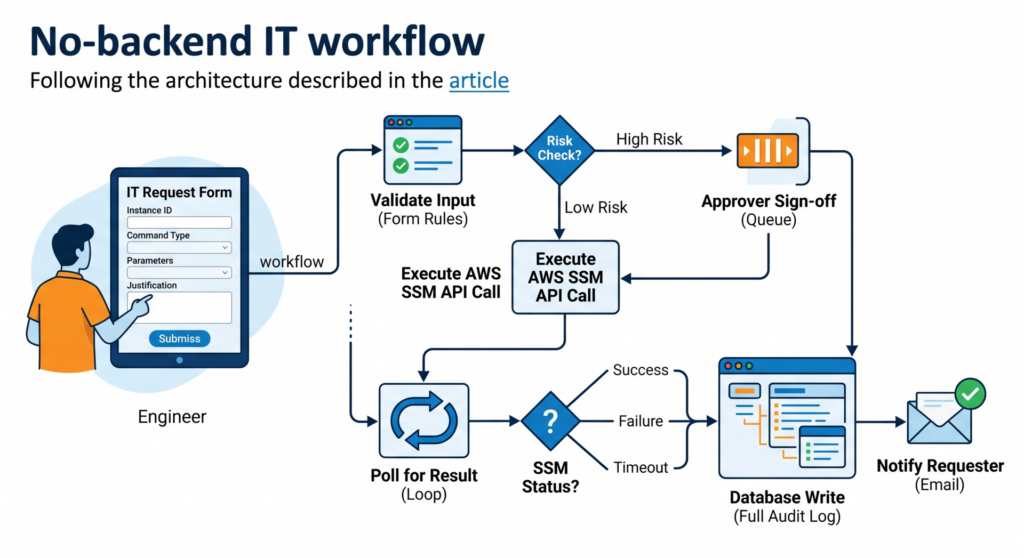
Every ops team ends up building the same internal tool: a form that calls an API, runs some logic, and writes the result somewhere. An incident ticket creator. A command runner for EC2 instances. A provisioning form that pings three different services.
The logic is always simple. The plumbing is always tedious — an Express server here, a Lambda there, a DynamoDB table you didn’t plan for.
This tutorial walks through a real-world scenario: an internal IT request form that calls the AWS Systems Manager (SSM) API to run commands on EC2 instances. You’ll add an approval gate for high-risk commands and a full audit log — all without writing a backend service. The workflow layer handles the API calls, conditional logic, error handling, and notifications.
What You Will Build
- An internal web form that captures an IT request (target instance, command type, requester)
- A workflow that validates input, calls AWS SSM
RunCommandvia REST, and logs the result - An approval gate — high-risk commands require a human sign-off before execution
- A response handler that writes SSM job output back to the requester
Prerequisites
- An AWS account with EC2 instances and SSM Agent installed and running
- An IAM user or role with
ssm:SendCommandandssm:GetCommandInvocationpermissions - AWS access key and secret (or an instance profile if running on EC2)
- A WEM account — free trial available, no credit card required
Why Not Just Write a Lambda?
The default answer for this kind of internal tooling is Lambda + API Gateway + DynamoDB. It works, but the overhead compounds fast.
| Layer | What you end up building |
|---|---|
| Form UI | HTML/JS or React form, hosted somewhere |
| API Gateway | Route config, CORS, auth integration |
| Lambda | Validation logic, AWS SDK calls, error handling |
| State & approvals | DynamoDB + another Lambda + SES or Slack webhook |
| Audit log | CloudWatch Logs, possibly a separate table |
| Access control | Cognito, IAM, or a custom auth layer |
A two-hour job becomes a two-week project. A workflow platform collapses all these layers into one: the form, the API calls, conditional logic, approval routing, and audit trail live in a single place — no application code required.
Architecture Overview
IT Engineer fills form
        ↓
Workflow: validate input fields
        ↓
Risk check (conditional branch)
    ├── Low risk  → call AWS SSM API directly
    └── High risk → route to approval queue
                         ↓
              Approver reviews & approves
                         ↓
              Call AWS SSM API
        ↓
Poll SSM for command result (loop with delay)
        ↓
Write output to audit log
        ↓
Return result to requester (email or portal)
Each box is a step in a visual workflow editor. No code between steps — just configuration.
Step 1: Build the Request Form
In WEM, forms are drag-and-drop. For this workflow you need five fields:
| Field | Type | Validation |
|---|---|---|
instance_id | Text input | Must match i-[0-9a-f]{17} |
command_type | Dropdown (enum) | Required — see values below |
parameters | Key-value pairs | Optional, passed to SSM document |
requester_email | Email input | Valid email format |
justification | Textarea | Required if command_type is RestartService or PatchNow |
Allowed values for command_type:
CheckDiskSpace— runsdf -h, low riskListRunningProcesses— runsps aux, low riskRestartService— runssystemctl restart {service}, high riskPatchNow— runsapt-get upgrade -yoryum update -y, high riskRunCustomScript— runs a pre-approved script from S3, high risk
WEM’s form validation runs client-side before submission. The regex on instance_id catches malformed IDs before they reach the workflow.
Step 2: Connect to the AWS SSM API
WEM’s HTTP connector lets you call any REST API from a workflow step. AWS SSM uses AWS Signature Version 4 for auth.
Configure the AWS Connector
Go to Integrations > HTTP Connectors and add a connector with these settings:
Name:          AWS SSM
Base URL:      https://ssm.{region}.amazonaws.com
Auth type:     AWS Signature V4
AWS Region:    eu-west-1
Service name:  ssm
Access Key ID: (from secrets vault)
Secret Key:    (from secrets vault)
Never hardcode AWS credentials in workflow config. Store them in WEM’s secrets vault — it encrypts at rest using AES-256.
The SSM SendCommand API Call
The SSM SendCommand endpoint:
POST https://ssm.{region}.amazonaws.com/
Content-Type: application/x-amz-json-1.1
X-Amz-Target: AmazonSSM.SendCommand
In WEM’s HTTP step, build the request body as a JSON template with variable substitution:
{
  "DocumentName": "AWS-RunShellScript",
  "InstanceIds": ["{{form.instance_id}}"],
  "Parameters": {
    "commands": ["{{resolved.command_string}}"]
  },
  "TimeoutSeconds": 60,
  "Comment": "Submitted by {{form.requester_email}} via IT portal"
}
Resolve the Command String First
Add a Transform step before the API call to map command_type to the actual shell command. This keeps raw shell strings out of the form and in one auditable place:
CheckDiskSpace       → "df -h"
ListRunningProcesses → "ps aux --sort=-%mem | head -20"
RestartService       → "systemctl restart {{form.parameters.service_name}}"
PatchNow             → "apt-get update && apt-get upgrade -y"
RunCustomScript      → "aws s3 cp s3://approved-scripts/{{form.parameters.script_name}} /tmp/ && bash /tmp/{{form.parameters.script_name}}"
Accepting freeform shell input from a web form is a remote code execution vulnerability. The enum + mapping pattern ensures users can only trigger pre-approved commands.
Step 3: Add the Risk Check and Approval Gate
After the form is submitted and the command is resolved, add a Conditional Branch step:
IF command_type IN [RestartService, PatchNow, RunCustomScript]
   → route to: Approval Queue
ELSE
   → route to: SSM Execute
The approval step creates a task in WEM’s human review queue, assigned to the on-call ops lead. The task card shows the requester, target instance, resolved command, justification text, and an SLA countdown — it auto-escalates after 4 hours with no response.
The approver can Approve, Reject, or Request More Info. Each action resumes the workflow at the appropriate branch.
Step 4: Poll for the SSM Command Result
SendCommand is asynchronous — it returns a CommandId immediately, but the command may still be running. You need to poll GetCommandInvocation until the status resolves.
In WEM, this is a Loop step:
Max iterations:   12
Wait between:     10 seconds
Exit condition:   response.Status IN [Success, Failed, TimedOut, Cancelled]
The HTTP call inside the loop:
GET https://ssm.{region}.amazonaws.com/
X-Amz-Target: AmazonSSM.GetCommandInvocation

{
  "CommandId": "{{ssm_send_response.CommandId}}",
  "InstanceId": "{{form.instance_id}}"
}
After the loop exits, add a second Conditional Branch on Status to route to the appropriate notification:
IF Status = "Success"    → Log Result + Notify Success
IF Status = "Failed"     → Log Error + Notify Failure
IF Status = "TimedOut"   → Log Timeout + Notify Timeout
IF Status = "InProgress" → Notify Still Running (loop exhausted)
Step 5: Write the Audit Log
Every execution — approved or not, successful or failed — should produce an audit record. Add a Database Write step that logs the full context:
{
  "request_id":        "{{workflow.run_id}}",
  "timestamp":         "{{workflow.started_at}}",
  "requester_email":   "{{form.requester_email}}",
  "instance_id":       "{{form.instance_id}}",
  "command_type":      "{{form.command_type}}",
  "resolved_command":  "{{resolved.command_string}}",
  "risk_level":        "{{resolved.risk_level}}",
  "approval_required": "{{resolved.approval_required}}",
  "approved_by":       "{{approval.reviewer_email}}",
  "approved_at":       "{{approval.decision_timestamp}}",
  "ssm_command_id":    "{{ssm_send_response.CommandId}}",
  "ssm_status":        "{{ssm_result.Status}}",
  "ssm_output":        "{{ssm_result.StandardOutputContent}}",
  "ssm_error":         "{{ssm_result.StandardErrorContent}}"
}
This record answers every question a security audit will ask: who ran what command, on which instance, when, with whose approval, and what the output was.
Step 6: Notify the Requester
The final step sends an email to requester_email. For a successful run:
Subject: [IT Portal] Command completed — {{form.instance_id}}

Your request has been processed.

Instance:  {{form.instance_id}}
Command:   {{form.command_type}}
Status:    {{ssm_result.Status}}
Completed: {{workflow.completed_at}}

Output:
{{ssm_result.StandardOutputContent}}

Request ID: {{workflow.run_id}}
(Use this ID to look up the full audit log)
For failures, include StandardErrorContent and a link to open a support ticket.
IAM Policy for SSM Execution
Scope down the IAM policy to exactly what the workflow needs. Here’s the minimum required:
{
  "Version": "2012-10-17",
  "Statement": [
    {
      "Sid": "AllowSSMSendCommand",
      "Effect": "Allow",
      "Action": [
        "ssm:SendCommand",
        "ssm:GetCommandInvocation",
        "ssm:ListCommandInvocations"
      ],
      "Resource": [
        "arn:aws:ssm:*:*:document/AWS-RunShellScript",
        "arn:aws:ec2:*:*:instance/*"
      ],
      "Condition": {
        "StringEquals": {
          "ssm:resourceTag/Environment": "production"
        }
      }
    }
  ]
}
The Condition block scopes the policy to instances tagged Environment=production. Adjust based on your tagging strategy. Never give the workflow connector ssm:* or ec2:* broad permissions — use separate credentials per workflow.
Testing the Workflow
1. Dry Run with a Safe Command
Start with CheckDiskSpace on a non-production instance. Verify a CommandId is returned and the poll loop completes with Status = Success.
2. Test the Approval Gate
Submit a RestartService request. Confirm the workflow pauses, the approval task appears in the queue, and the workflow only resumes after an approval decision.
3. Test the Timeout Path
Stop the SSM Agent on a test instance:
sudo systemctl stop amazon-ssm-agentSubmit a command. After 2 minutes the SSM status should return TimedOut and the workflow should route to the timeout notification branch.
4. Verify the Audit Log
After each test, query the audit log and confirm all fields are populated — especially approved_by and ssm_output. These are the fields a security review will ask for first.
What This Replaces
| Traditional approach | What you skip | Handled by workflow layer |
|---|---|---|
| Express / Flask backend | Server setup, routing, middleware | HTTP connector + variable mapping |
| Approval emails / Slack DMs | Manual follow-up, easy to lose | Built-in approval queue with SLA escalation |
| DynamoDB + Lambda | Table schema, SDK calls, error handling | Database Write step — schema defined in UI |
| CloudWatch Logs | Log group config, IAM policies, log queries | Built-in audit trail with search |
| Cognito / custom auth | User pool config, token validation | Role-based access on forms and queues |
Conclusion
The pattern here — form → API call → conditional approval → result notification → audit log — applies to dozens of internal ops tools. Firewall rule requests, DNS change workflows, database access provisioning, SSL certificate renewals. Once you have the AWS SSM connector configured and the approval queue set up, the next workflow takes hours instead of weeks.
The audit trail is the part people skip and regret. When something goes wrong on a production instance, the first question is always “who ran what and when.” A workflow platform gives you that answer automatically — no extra code required.
WEM is a no-code enterprise platform with a free account available — no credit card required. The WEM Modeler, HTTP connector, conditional workflow logic, approval queues, and audit logging are all accessible when you sign up, giving you everything you need to build and test the full workflow in this tutorial. When you’re ready to deploy to production, WEM’s Professional and Enterprise plans cover scaling, dedicated hosting, and SLA-backed support.