Linuxbeast Developer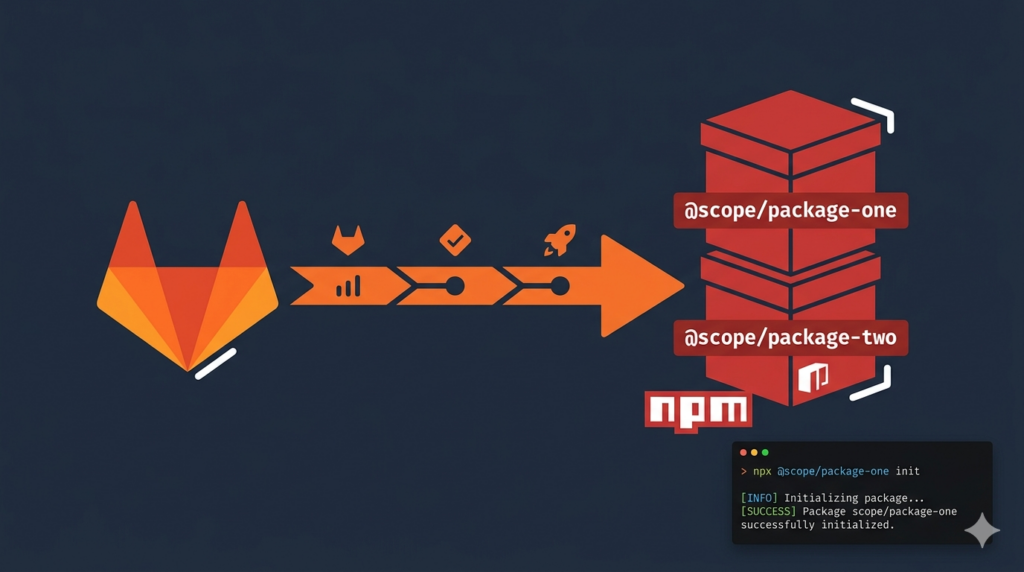
This guide shows how to publish a public NPM package via GitLab Package Registry using a CI/CD pipeline. The setup lets anyone install your package with npx — no GitLab account, no token, no authentication. The examples are run on WSL2 Ubuntu in Windows, but they work on any Linux system with Node.js installed.
You’ll also see a clean pattern for publishing a single package from one repository by synthesizing a fresh package.json at publish time, so credentials and internal files never leak to the published artifact.
Why GitLab Package Registry instead of npmjs.org
npmjs.org is the default for public packages, but GitLab Package Registry is a strong alternative when:
- Your source code already lives on GitLab and you want one platform for repo, CI/CD, and packages
- You need fast token rotation — GitLab deploy tokens can be deleted and recreated in seconds
- You want to delete a bad release immediately (no 72-hour unpublish window like npmjs.com)
- You prefer keeping publish credentials inside your existing GitLab CI variables
The trick is hosting the registry under a public GitLab group, which makes the package installable without authentication.
Prerequisites
- A GitLab account with permission to create groups and projects
- A source project on GitLab that contains your package code
- Node.js 18 or 20 installed locally — see How to Switch Node.js Version in WSL Ubuntu if you need version management
- WSL2 Ubuntu (or any Linux/macOS shell) — see How to Install Ubuntu 20.04 or 22.04 in WSL 2 if you need WSL set up
Architecture: One Package from One Repo
This guide assumes a repo containing one tool — for example a CLI. The pipeline publishes a single focused package that consumers install with npx:
| Package | Scope | Install command |
|---|---|---|
@your-org-public/cli-tool | @your-org-public | npx @your-org-public/cli-tool |
Instead of publishing the repo as-is, the pipeline synthesizes a fresh package.json in a staging/ directory at publish time. This keeps internal scripts, dev dependencies, and CI files out of the public artifact.
Step 1: Create the Public Destination Project
The package is published to a project inside a public GitLab group. This project hosts the package registry — it does not contain source code.
- Create or use an existing public group (for example
your-org-public) - Inside that group, click New project → Create blank project
- Name it something like
public-packages - Set Visibility to
Public - Tick Initialize with a README so the project is not empty
- Click Create project
Open Settings → General and copy the Project ID shown at the top — you’ll need it as a CI variable.
Step 2: Create a Deploy Token
Use a deploy token instead of CI_JOB_TOKEN. CI_JOB_TOKEN can only publish to its own project’s registry — it cannot publish cross-project to a different group’s registry.
- In the destination project go to Settings → Repository → Deploy tokens
- Click Add token
- Name it
ci-npm-publish - Tick the
write_package_registryscope only - Click Create deploy token
- Copy the password immediately — it is shown only once
The token password format looks like gldt-XXXXXXXXXXXX. The deploy token username is not needed — GitLab’s NPM registry uses Bearer auth, so the password alone is enough as _authToken.
Step 3: Add CI/CD Variables in the Source Project
Variables go in the source project (the one with your code), not the destination project.
Go to Settings → CI/CD → Variables and add:
| Variable | Value | Masked | Protected |
|---|---|---|---|
PUBLIC_PROJECT_ID | The Project ID from Step 1 | No | No |
NPM_PUBLIC_TOKEN | gldt-XXXXXXXXXXXX | Yes | Yes |
Always mark the token as Masked so it never appears in job logs. You don’t need a username variable — leave it out.
Step 4: Write the GitLab CI/CD Pipeline
The pipeline below has four stages: lint, test, build, and publish. Publish jobs only run on version tags matching v<semver> — push to main does nothing on its own.
Save this as .gitlab-ci.yml at the repo root:
variables:
  NODE_VERSION: "20"
  NPM_SCOPE: "@your-org-public"
  REGISTRY_URL: "https://gitlab.com/api/v4/projects/${PUBLIC_PROJECT_ID}/packages/npm/"

default:
  image: node:${NODE_VERSION}

stages:
  - lint
  - test
  - build
  - publish

.publish_setup: &publish_setup
  before_script:
    - echo "${NPM_SCOPE}:registry=${REGISTRY_URL}" > .npmrc
    - echo "//gitlab.com/api/v4/projects/${PUBLIC_PROJECT_ID}/packages/npm/:_authToken=${NPM_PUBLIC_TOKEN}" >> .npmrc

lint:
  stage: lint
  script:
    - npm ci
    - npm run lint
  rules:
    - if: $CI_PIPELINE_SOURCE == "merge_request_event"
    - if: $CI_COMMIT_TAG =~ /^v\d+\.\d+\.\d+/

test:
  stage: test
  script:
    - npm ci
    - npm test
  rules:
    - if: $CI_PIPELINE_SOURCE == "merge_request_event"
    - if: $CI_COMMIT_TAG =~ /^v\d+\.\d+\.\d+/

publish:
  stage: publish
  <<: *publish_setup
  script:
    - npm ci
    - mkdir -p staging/pkg
    - cp -r bin src README.md staging/pkg/
    - node scripts/build-package-json.js > staging/pkg/package.json
    - cd staging/pkg && npm publish --access public
  rules:
- if: $CI_COMMIT_TAG =~ /^v\d+\.\d+\.\d+/.publish_setup— a YAML anchor that writes.npmrcat runtime so credentials never touch git_authToken— Bearer auth format used by GitLab’s NPM registry (do not use_auth)npm publish --access public— required for scoped packages, otherwise NPM defaults to private$CI_COMMIT_TAG =~ /^v\d+\.\d+\.\d+/— only runs when you push av1.0.0-style tag
The package.json synthesizer
The scripts/build-package-json.js file generates a fresh package.json with the version pulled from the git tag. A minimal version:
const version = process.env.CI_COMMIT_TAG?.replace(/^v/, "") || "0.0.0";

const pkg = {
  name: "@your-org-public/cli-tool",
  version,
  description: "Public CLI tool",
  bin: { "cli-tool": "bin/cli.js" },
  files: ["bin", "src"],
  license: "MIT",
  engines: { node: ">=18" },
};

console.log(JSON.stringify(pkg, null, 2));
The files field defines what gets published — anything not listed is excluded, which keeps internal scripts and tests out of the public package.
Step 5: Cut the First Release
Merge your pipeline changes to main, then tag and push:
git checkout main
git pull
git tag v1.0.0
git push origin v1.0.0
The tag triggers lint → test → publish. Watch CI/CD → Pipelines in the source project — the publish job must exit with status 0.
Then go to your destination project and open Deploy → Package Registry. You should see your package at version 1.0.0.
Step 6: Install the Package as a Consumer
Anyone (including users without GitLab accounts) can now install your package — but they need to point the scope at GitLab first. Without this step, NPM looks on registry.npmjs.org and returns E404.
npm config set @your-org-public:registry https://gitlab.com/api/v4/groups/your-org-public/-/packages/npm/Or per-project, add to .npmrc:
echo "@your-org-public:registry=https://gitlab.com/api/v4/groups/your-org-public/-/packages/npm/" >> .npmrcThen run the package:
npx @your-org-public/cli-toolNote: do not use npx --registry <url>. That flag routes all dependency fetches through GitLab, which causes E404 on transitive dependencies that live on npmjs.org. Set the scope-specific registry instead.
Common Errors and Fixes
ENEEDAUTH during publish
This happens when .npmrc uses _auth (Basic Auth, base64 of username:password) instead of _authToken. The Basic Auth format is for Docker registries — GitLab’s NPM registry needs a Bearer token. Use the deploy token password directly as _authToken.
E404 when installing
You forgot to point the scope at GitLab. Run the npm config set command from Step 6, or check that the .npmrc in your project has the right scope line.
403 Forbidden during publish
The deploy token is missing the write_package_registry scope, or the destination project’s Package Registry feature is disabled. Recreate the token with the right scope, or enable the registry in Settings → General → Visibility, project features, permissions.
Pipeline doesn’t run on tag push
The tag must match v<major>.<minor>.<patch>. Tags like release-1.0 or 1.0.0 (no v prefix) won’t trigger the rule. Pre-release suffixes like v1.1.0-beta.1 still match.
Rollback Plan
If a bad version ships, GitLab Package Registry has no unpublish delay — you can delete versions instantly:
- Open Deploy → Package Registry in the destination project
- Find the bad version of your package and delete it
- Delete the git tag locally and remotely:
git tag -d v1.0.0 && git push origin :refs/tags/v1.0.0 - Revert the breaking commit on
main - Re-tag with a new patch version (
v1.0.1) to trigger a clean republish
Security Notes
- The deploy token has only
write_package_registryscope — it cannot read source code or push commits - Enforce branch protection on
mainwith at least 1 MR approval, so no one can ship a release without review - Use the files field in your synthesized
package.jsonto control what gets published — never publish secrets, internal scripts, or test fixtures - Rotate the deploy token periodically: delete the old one, create a new one, update
NPM_PUBLIC_TOKENin CI variables
If you also use private GitLab Container Registry images in your pipeline, see How to Pull Docker Images from Private GitLab Registry with GitLab CI/CD — the auth pattern is different (Basic, not Bearer) and easy to confuse with the NPM flow.
Conclusion
You now have a GitLab CI/CD pipeline that publishes a public NPM package on every version tag, with no credentials in git and no consumer authentication required. The synthesized package.json pattern keeps internal files out of the published artifact while keeping your repo simple.
For more GitLab CI/CD tips, check out Fixing GitLab CI/CD Hangs When Building Docker Images.