Linuxbeast Developer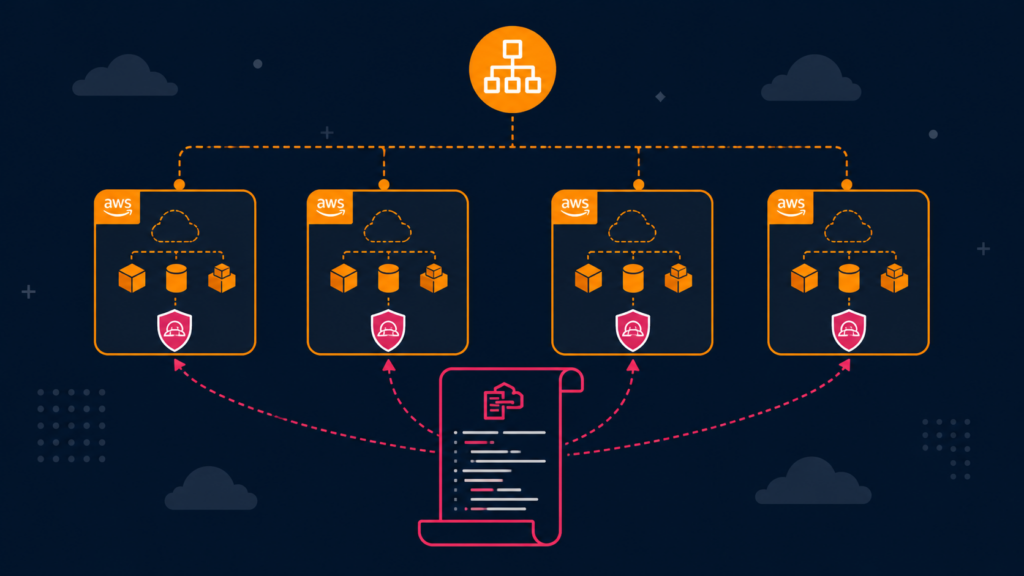
If you run a multi-account AWS Organization, you have probably hit this problem: a tooling service in one account needs read-only access to resources in every other account. Doing that by hand means logging into each account, creating the same IAM role, and praying you do not typo the trust policy on account number 23. CloudFormation StackSets solve this, one template, deployed across an entire Organizational Unit (OU), in one command.
This guide walks you through a real cross-account discovery setup I deployed a few weeks ago: a CloudFormation StackSet that creates a read-only IAM role and enables AWS Resource Explorer 2 in every member account, all driven from the Organization management account. The examples are run on WSL2 Ubuntu in Windows, but they work the same on any Ubuntu system.
What a StackSet Actually Does
A StackSet is a CloudFormation template plus a list of target accounts and regions. CloudFormation creates one stack instance per account-region pair, all from a single source of truth. Update the template once, and every member stack picks up the change.
In this example, each target account ends up with two things:
- A read-only IAM role (
CrossAccountDiscoveryRole) that a tooling account can assume - An AWS Resource Explorer 2 index so the Search API actually returns results
Prerequisites
- An AWS Organization with at least two accounts (a management account and one or more member accounts)
- StackSets enabled in service-managed mode (the management account permission setup is done once via AWS Organizations)
- AWS CLI v2 installed and configured. See How to Install AWS CLI v2 on Ubuntu 22.04
- SSO access to the management account, if you have not set that up yet. Follow How to Configure AWS SSO CLI Access for Linux Ubuntu
- A basic understanding of cross-account IAM trust, covered in How to Set Up Cross-Account Access in AWS with AssumeRole
The CloudFormation Template
Save this as cross-account-discovery.yaml. It is parameterized so you do not have to hardcode account IDs or role patterns into the template.
AWSTemplateFormatVersion: '2010-09-09'
Description: Cross-account discovery role + Resource Explorer 2 index.

Parameters:
  TrustedAccountId:
    Type: String
    AllowedPattern: '^\d{12}$'
    Description: Account ID where the tooling service runs.

  TrustedRolePattern:
    Type: String
    Default: 'ecs-task-role-*'
    Description: Role name pattern allowed to assume the discovery role.

  ResourceExplorerIndexType:
    Type: String
    Default: LOCAL
    AllowedValues: [LOCAL, AGGREGATOR]

  CreateResourceExplorerIndex:
    Type: String
    Default: 'true'
    AllowedValues: ['true', 'false']

Conditions:
  ShouldCreateIndex: !Equals [!Ref CreateResourceExplorerIndex, 'true']

Resources:
  CrossAccountDiscoveryRole:
    Type: AWS::IAM::Role
    Properties:
      RoleName: CrossAccountDiscoveryRole
      MaxSessionDuration: 3600
      AssumeRolePolicyDocument:
        Version: '2012-10-17'
        Statement:
          - Effect: Allow
            Principal:
              AWS: !Sub 'arn:aws:iam::${TrustedAccountId}:root'
            Action: sts:AssumeRole
            Condition:
              StringLike:
                'aws:PrincipalArn': !Sub 'arn:aws:iam::${TrustedAccountId}:role/${TrustedRolePattern}'
      Policies:
        - PolicyName: ResourceExplorerReadOnly
          PolicyDocument:
            Version: '2012-10-17'
            Statement:
              - Effect: Allow
                Action:
                  - resource-explorer-2:Search
                  - resource-explorer-2:GetView
                  - resource-explorer-2:ListViews
                  - resource-explorer-2:ListIndexes
                  - resource-explorer-2:GetIndex
                  - tag:GetResources
                Resource: '*'

  ResourceExplorerIndex:
    Type: AWS::ResourceExplorer2::Index
    Condition: ShouldCreateIndex
    Properties:
      Type: !Ref ResourceExplorerIndexType
      Tags:
        managed-by: stackset

Outputs:
  RoleArn:
    Value: !GetAtt CrossAccountDiscoveryRole.Arn
A few things worth pointing out:
- The trust policy uses a
StringLikecondition onaws:PrincipalArn. Without it, any principal in the trusted account can assume the role. With it, only roles matching the pattern (e.g.,ecs-task-role-*) can. - All actions are read-only. The
tag:GetResourcespermission requiresResource: '*'because the Resource Groups Tagging API does not support resource-level permissions. CreateResourceExplorerIndexis a flag because some accounts may already have a Resource Explorer index, creating a second one will fail the stack.
Step-by-Step Guide
1. Log in to the management account
StackSets that target an OU must be created from the Organization management account.
aws sso login --profile org-master.admin
aws sts get-caller-identity --profile org-master.admin
Replace org-master.admin with whatever profile name you use for the management account.
2. Validate the template
aws cloudformation validate-template \
  --template-body file://cross-account-discovery.yaml \
  --profile org-master.admin
If the template is valid, you will see the parameters and capabilities echoed back. If not, fix the YAML before going any further.
3. Create the StackSet
aws cloudformation create-stack-set \
  --stack-set-name CrossAccountDiscoveryRole \
  --template-body file://cross-account-discovery.yaml \
  --parameters \
    ParameterKey=TrustedAccountId,ParameterValue=123456789012 \
    ParameterKey=TrustedRolePattern,ParameterValue=ecs-task-role-* \
    ParameterKey=ResourceExplorerIndexType,ParameterValue=LOCAL \
    ParameterKey=CreateResourceExplorerIndex,ParameterValue=true \
  --capabilities CAPABILITY_NAMED_IAM \
  --permission-model SERVICE_MANAGED \
  --auto-deployment Enabled=true,RetainStacksOnAccountRemoval=false \
--profile org-master.adminSERVICE_MANAGEDpermission model, uses Organizations-managed IAM roles instead of self-managed ones--auto-deployment Enabled=true: when a new account joins a target OU, the stack is created automaticallyCAPABILITY_NAMED_IAMis required because we set a fixedRoleName- Replace
123456789012with the AWS account ID of your tooling account
4. Deploy to an OU
Creating the StackSet does not deploy anything yet. You need stack instances, scoped to one or more OUs.
aws cloudformation create-stack-instances \
  --stack-set-name CrossAccountDiscoveryRole \
  --deployment-targets OrganizationalUnitIds=ou-xxxx-aaaaaaaa \
  --regions us-east-1 \
  --operation-preferences FailureTolerancePercentage=50,MaxConcurrentPercentage=100 \
--profile org-master.adminou-xxxx-aaaaaaaa: replace with your actual OU ID (find it viaaws organizations list-organizational-units-for-parent)FailureTolerancePercentage=50: keep going even if half the accounts fail; useful when you have one weird account that needs special handlingMaxConcurrentPercentage=100: fan out to all accounts at once
5. Watch the rollout
aws cloudformation list-stack-instances \
  --stack-set-name CrossAccountDiscoveryRole \
  --query 'Summaries[*].{Account:Account,Status:StackInstanceStatus.DetailedStatus}' \
  --profile org-master.admin
You will see a row per account with statuses like PENDING, RUNNING, SUCCEEDED, or FAILED. Most stacks finish in 1-3 minutes.
6. Update the template later
This is where StackSets really pay off. Edit the YAML, then push the change to every account in one command:
aws cloudformation update-stack-set \
  --stack-set-name CrossAccountDiscoveryRole \
  --template-body file://cross-account-discovery.yaml \
  --parameters \
    ParameterKey=TrustedAccountId,UsePreviousValue=true \
    ParameterKey=TrustedRolePattern,UsePreviousValue=true \
    ParameterKey=ResourceExplorerIndexType,UsePreviousValue=true \
    ParameterKey=CreateResourceExplorerIndex,UsePreviousValue=true \
  --capabilities CAPABILITY_NAMED_IAM \
  --profile org-master.admin
UsePreviousValue=true tells CloudFormation to reuse the parameter value from the existing stack set, so you do not need to repeat the account ID every time.
Common Gotchas
| Symptom | Cause |
|---|---|
Index already exists in some accounts |
Resource Explorer was enabled previously. Set CreateResourceExplorerIndex=false for those accounts via stack instance overrides. |
AccessDenied from the management account |
Service-managed StackSets need trusted access enabled in Organizations. Run aws organizations enable-aws-service-access --service-principal stacksets.cloudformation.amazonaws.com once. |
| Role created but assume role fails | The aws:PrincipalArn condition pattern does not match. Confirm the actual role name in the tooling account matches the pattern. |
| Drift in some accounts | Someone edited the role manually. Run detect-stack-set-drift to find them, then re-deploy. |
Why This Beats Per-Account Setup
- One source of truth. The role definition lives in Git as a CloudFormation template. No drift unless someone goes out of band.
- Auto-deploy on new accounts. When a new account is added to a target OU, the role and index appear without anyone touching it.
- Safe rollback. Update the StackSet with the previous template version, and every account rolls back together.
- Audit trail. Every change is a CloudFormation event, visible in CloudTrail.
Conclusion
StackSets turn a tedious “log in to 30 accounts and click around” job into a single CLI command, with auto-deployment for any future accounts you add to the OU. If your tooling needs cross-account read access, this is the path of least pain.
From here, you might want to read How to Copy S3 Bucket Objects Across AWS Accounts for a different cross-account use case, or How to Access AWS Secrets Manager from Another Account if your tooling also needs cross-account secrets.