How to Make Reliable HubSpot API Requests in Python with Retry Logic

5 min read

HubSpot API calls can fail for reasons outside your control — rate limits (HTTP 429), temporary server errors (5xx), or network timeouts. If your code just crashes on the first failure, your integration is going to be unreliable. This guide shows you how to build a reusable Python function with retry logic and exponential backoff for HubSpot API requests so transient errors are handled automatically.

Why API Requests Fail

When calling the HubSpot API, you’ll run into these common failures:

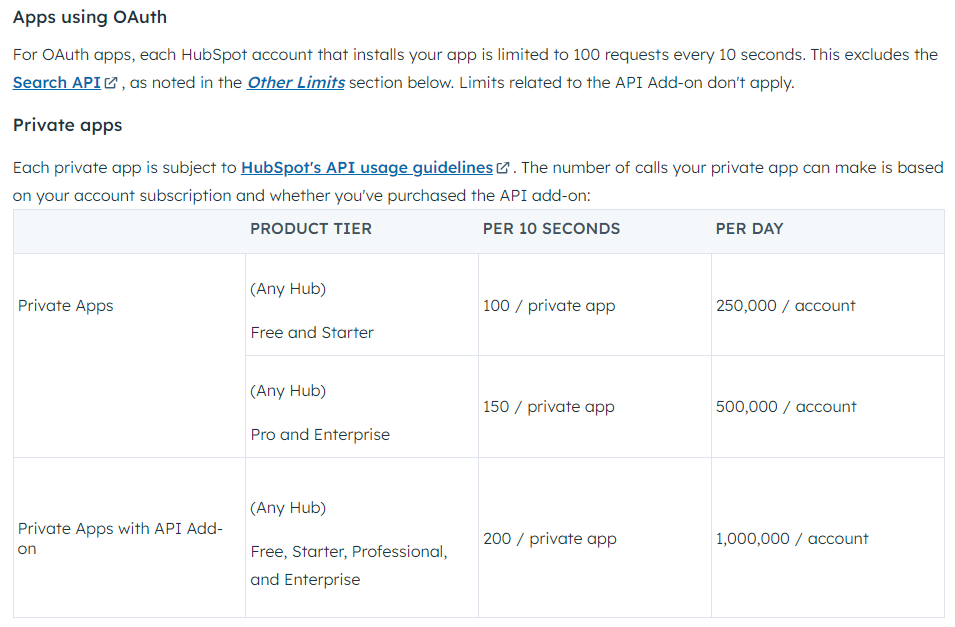
  • 429 Too Many Requests — you’ve hit HubSpot’s rate limit (10 requests per second for OAuth, 100 per 10 seconds for private apps)
  • 500/502/503 — temporary server-side errors on HubSpot’s end
  • Connection timeouts — network issues between your app and HubSpot

Here’s what a 429 response looks like from HubSpot:

{
    "status": "error",
    "message": "You have reached your secondly limit.",
    "errorType": "RATE_LIMIT",
    "correlationId": "fddeaec3-xxxx-xxxx-xxxx-xxxxxxxxxxxx",
    "policyName": "SECONDLY"
}

The fix is to retry the request after a short delay instead of failing immediately. Each retry waits longer than the last — this is called exponential backoff.

The Retry-Enabled Request Function

Here’s a reusable function that handles all the common failure modes. It supports GET, POST, PATCH, PUT, and DELETE, retries on server errors and rate limits, and returns None on non-retryable errors (like 401 or 404).

import requests
import time
import json
import logging

logger = logging.getLogger(__name__)

API_ACCESS_TOKEN = "YOUR_ACCESS_TOKEN"
MAX_RETRIES = 4
INITIAL_DELAY = 2  # seconds
TIMEOUT = 30  # seconds


def hubspot_request(url, method="GET", payload=None, params=None):
    """Send an HTTP request to HubSpot with retry logic and exponential backoff."""

    headers = {
        "Content-Type": "application/json",
        "Authorization": f"Bearer {API_ACCESS_TOKEN}",
    }

    delay = INITIAL_DELAY

    for attempt in range(1, MAX_RETRIES + 1):
        try:
            response = requests.request(
                method=method.upper(),
                url=url,
                headers=headers,
                json=payload,
                params=params,
                timeout=TIMEOUT,
            )

            status = response.status_code

            # Success
            if status in (200, 201):
                return {
                    "statusCode": status,
                    "body": response.json(),
                    "method": method.upper(),
                    "url": url,
                }

            # No content (e.g., successful DELETE)
            if status == 204:
                return {"statusCode": 204, "body": None}

            # Rate limited — use Retry-After header if provided
            if status == 429:
                retry_after = int(response.headers.get("Retry-After", delay))
                logger.warning(
                    "Rate limit hit (attempt %d/%d). Retrying in %ds. URL: %s",
                    attempt, MAX_RETRIES, retry_after, url,
                )
                time.sleep(retry_after)
                delay *= 2
                continue

            # Server error — retryable
            if status >= 500:
                logger.warning(
                    "Server error %d (attempt %d/%d). Retrying in %ds. URL: %s",
                    status, attempt, MAX_RETRIES, delay, url,
                )
                time.sleep(delay)
                delay *= 2
                continue

            # Client errors — not retryable
            logger.error(
                "Client error %d: %s. URL: %s", status, response.text, url
            )
            return None

        except requests.exceptions.ConnectionError as e:
            logger.warning("Connection error (attempt %d/%d): %s", attempt, MAX_RETRIES, e)
            time.sleep(delay)
            delay *= 2

        except requests.exceptions.Timeout as e:
            logger.warning("Timeout (attempt %d/%d): %s", attempt, MAX_RETRIES, e)
            time.sleep(delay)
            delay *= 2

        except requests.exceptions.RequestException as e:
            logger.error("Request failed with unexpected error: %s", e)
            return None

    logger.error("All %d attempts failed. URL: %s", MAX_RETRIES, url)
    return None

How the Retry Logic Works

Here’s what happens on each request:

  1. Send the request to HubSpot
  2. If the response is 200/201 — return the parsed JSON body
  3. If the response is 204 — return success with no body (common for DELETE)
  4. If the response is 429 — read the Retry-After header and wait that many seconds before retrying
  5. If the response is 5xx — wait with exponential backoff and retry
  6. If the response is 4xx (except 429) — return None immediately (these won’t fix themselves with a retry)
  7. If a connection error or timeout occurs — wait and retry
  8. After all retries are exhausted — return None

The delay doubles after each retry: 2s, 4s, 8s, 16s. This prevents your code from hammering the API when it’s already under load.

Key Design Decisions

requests.request() Instead of if/elif Chains

Instead of writing separate if method == "GET" / elif method == "POST" branches, the function uses requests.request(method, url, ...) which accepts the HTTP method as a string. Cleaner and handles any valid method.

Exception Order Matters

The except blocks go from specific to general: ConnectionError and Timeout first, then RequestException last. This matters because ConnectionError and Timeout are subclasses of RequestException — if you catch the parent class first, the specific handlers never run.

  • ConnectionError and Timeout — retryable, so we sleep and try again
  • RequestException (anything else) — unexpected error, return None immediately

Why Not Retry 4xx Errors

A 401 (bad token), 403 (no permission), or 404 (wrong URL) will give you the same response no matter how many times you retry. These are bugs in your code or configuration, not transient failures. The function returns None immediately and logs the error so you can fix it.

Usage Examples

Get Contacts

response = hubspot_request(
    "https://api.hubapi.com/crm/v3/objects/contacts",
    method="GET",
    params={"limit": 10},
)

if response:
    contacts = response["body"]["results"]
    for contact in contacts:
        print(contact["properties"]["email"])
else:
    print("Failed to retrieve contacts")

Create a Contact

response = hubspot_request(
    "https://api.hubapi.com/crm/v3/objects/contacts",
    method="POST",
    payload={
        "properties": {
            "email": "you@example.com",
            "firstname": "Jane",
            "lastname": "Doe",
        }
    },
)

if response:
    print(f"Created contact: {response['body']['id']}")
else:
    print("Failed to create contact")

Update a Deal

deal_id = "12345678"
response = hubspot_request(
    f"https://api.hubapi.com/crm/v3/objects/deals/{deal_id}",
    method="PATCH",
    payload={
        "properties": {
            "dealstage": "closedwon",
            "amount": "5000",
        }
    },
)

if response:
    print(f"Updated deal {deal_id}")
else:
    print("Failed to update deal")

Using This in AWS Lambda

If you’re running this inside a Lambda function, keep these things in mind:

  • Set your Lambda timeout high enough to accommodate retries. With 4 retries and exponential backoff (2 + 4 + 8 + 16 = 30 seconds of sleep time alone), your function needs at least 60 seconds of timeout. See How to Avoid AWS Lambda Timeout When Processing HubSpot Records for strategies.
  • Store your access token in environment variables or AWS Secrets Manager — not hardcoded in the function.
  • Use structured logging so you can search for failed requests in CloudWatch Logs. The logging module output appears automatically in CloudWatch.

Conclusion

Adding retry logic with exponential backoff to your HubSpot API calls prevents transient errors from breaking your integration. The function retries on 429 rate limits and 5xx server errors, respects the Retry-After header, and fails fast on client errors that won’t fix themselves.

If you’re building a larger HubSpot integration, check out Sync HubSpot Company Records to S3 Using AWS Lambda and Step Functions for a real-world use of this pattern. For linking the records you create, see How to Use HubSpot CRM v4 Associations.