If you’re using AWS Lambda to pull and process records from HubSpot, you’ve probably hit this error at some point: Task timed out after 900.10 seconds. That’s Lambda’s hard 15-minute execution limit, and once your HubSpot dataset grows past a certain size, a single Lambda invocation just isn’t enough to get through everything.
The fix isn’t to make Lambda faster or bump up the timeout — you’re already at the max. Instead, you break the work into batches and use AWS Step Functions to loop through them. Each Lambda call handles a chunk of records and tells Step Functions whether there’s more data left. If there is, it loops back and picks up where it stopped.
This guide walks through the architecture, the Step Functions state machine definition, and the Lambda function code in Python. If you’re already working with the HubSpot API in Python, this pattern fits right into that workflow.
Why Lambda Times Out with Large HubSpot Datasets
HubSpot’s CRM API returns records in pages — usually 100 at a time. If you only have a few hundred records, a single Lambda can loop through all the pages and finish within the timeout. But once you’re dealing with thousands (or tens of thousands) of company, contact, or deal records, the math changes fast.
Each page means an API call, and each record might need processing — transformations, writes to a database, uploads to S3, whatever your pipeline does. Add in HubSpot’s rate limits and the occasional slow response, and suddenly 15 minutes isn’t enough. Lambda hits the timeout, the execution dies, and you’re left with partially processed data.
You can’t extend Lambda’s timeout beyond 900 seconds. That’s a hard limit from AWS. So the solution is to stop trying to do everything in one shot and instead design for multiple invocations.
The Solution: Step Functions with Batched Lambda Calls
Instead of one Lambda call doing all the work, you use a Step Functions state machine that:
- Starts with an offset of 0
- Invokes Lambda to fetch and process a batch of HubSpot records
- Lambda processes as many pages as it can within a safe time window
- Lambda returns either
"complete"(all done) or"incomplete"with the next offset - Step Functions checks the status — if incomplete, it loops back to step 2
- When complete, the state machine ends
This is essentially a serverless while loop. Lambda handles the work, Step Functions handles the looping. You’re no longer bound by a single 15-minute window — the state machine can keep invoking Lambda as many times as needed.
If you’ve already built a pipeline that syncs HubSpot records to S3 using Step Functions, this pattern will feel familiar.
Step Functions State Machine Definition
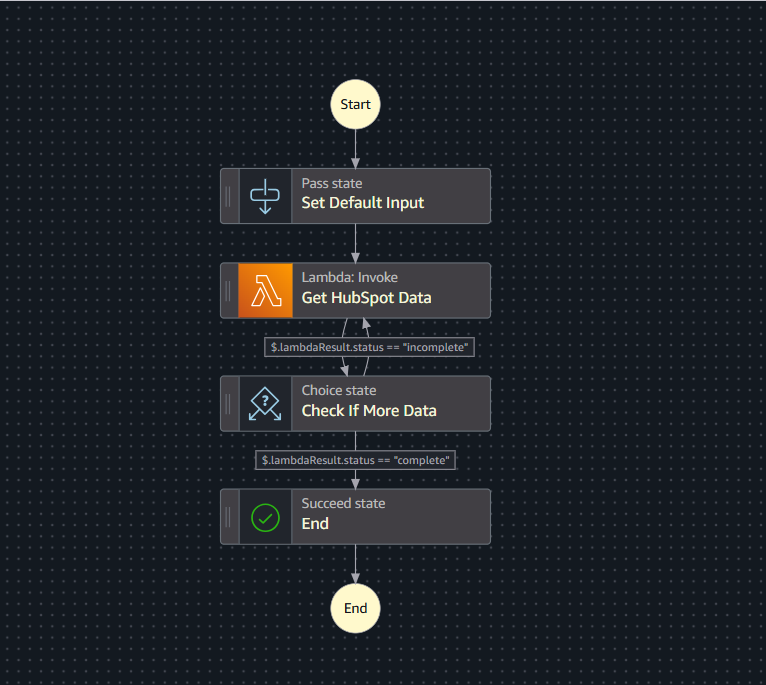
Here’s the full state machine definition in Amazon States Language (ASL). It initializes the offset, calls your Lambda function, and loops until Lambda reports that all records are processed.
{
  "Comment": "State Machine to process HubSpot records in batches",
  "StartAt": "Set Default Input",
  "States": {
    "Set Default Input": {
      "Type": "Pass",
      "Result": {
        "lambdaResult": {
          "offset": 0
        }
      },
      "ResultPath": "$",
      "Next": "Get HubSpot Data"
    },
    "Get HubSpot Data": {
      "Type": "Task",
      "Resource": "arn:aws:lambda:us-east-1:123456789012:function:your-lambda-function:$LATEST",
      "Parameters": {
        "offset.$": "$.lambdaResult.offset"
      },
      "ResultPath": "$.lambdaResult",
      "Next": "Check If More Data"
    },
    "Check If More Data": {
      "Type": "Choice",
      "Choices": [
        {
          "Variable": "$.lambdaResult.status",
          "StringEquals": "complete",
          "Next": "End"
        },
        {
          "Variable": "$.lambdaResult.status",
          "StringEquals": "incomplete",
          "Next": "Get HubSpot Data"
        }
      ]
    },
    "End": {
      "Type": "Succeed"
    }
  }
}
Here’s what each state does:
- Set Default Input — a
Passstate that initializes the offset to 0. This is the starting point for pagination. - Get HubSpot Data — invokes your Lambda function, passing the current offset. The Lambda result gets stored in
$.lambdaResult. - Check If More Data — a
Choicestate that reads$.lambdaResult.status. If"incomplete", it loops back to Get HubSpot Data with the updated offset. If"complete", it moves to the end. - End — a
Succeedstate that terminates the execution.
Replace 123456789012 with your actual AWS account ID and update the function name to match your Lambda. If you’re working with Lambda’s event structure for the first time, Understanding Lambda’s Event and Context Parameters will help clarify how the offset gets passed in.
Lambda Function Implementation
The Lambda function receives the offset from Step Functions, fetches HubSpot records starting from that offset, and processes them one page at a time. The key part is the time check — before fetching the next page, it checks how long it’s been running. If it’s close to the safe limit, it stops early and returns "incomplete" with the next offset so Step Functions can re-invoke it.
import time

TIME_LIMIT = 840  # 14 minutes — leaves buffer before the 15-min hard limit


def lambda_handler(event, context):
    start_time = time.time()
    offset = event.get("offset", 0)

    while True:
        records, next_offset = function_to_get_company_records(offset)

        if not records:
            break

        for record in records:
            function_to_process_company_records(record)

        if not next_offset:
            break

        offset = next_offset

        if time.time() - start_time > TIME_LIMIT:
            return {
                "status": "incomplete",
                "offset": next_offset
            }

    return {
        "status": "complete"
    }
A few things to note:
TIME_LIMIT = 840is set to 14 minutes (840 seconds). This gives a 60-second buffer before Lambda’s 900-second hard limit. You want enough room for the current page to finish processing and for the return payload to be sent back to Step Functions.function_to_get_company_records(offset)is a placeholder for your actual HubSpot API call. It should return a tuple of(records, next_offset)wherenext_offsetisNonewhen there are no more pages.function_to_process_company_records(record)is where you do whatever you need with each record — save to a database, upload to S3, transform and forward, etc.- The time check happens between pages, not between individual records. This keeps things simple and avoids overhead from checking the clock on every single record.
Handling Mid-Page Timeouts
There’s a subtle issue with the approach above. The time check happens between page fetches, but what if processing the records on a single page takes a long time? If each record involves heavy processing — say, multiple API calls or large data writes — you could still hit the timeout in the middle of a page.
There are two common approaches to handle this.
Approach A: Reprocess the Entire Page (Simple)
When the time limit is reached mid-page, return the current offset instead of the next one. Step Functions will re-invoke Lambda starting from the same page, which means some records on that page get processed twice.
for record in records:
    if time.time() - start_time > TIME_LIMIT:
        return {
            "status": "incomplete",
            "offset": offset  # same offset — reprocess this page
        }
    function_to_process_company_records(record)
This works fine if your processing logic is idempotent — meaning processing the same record twice doesn’t cause issues. For example, if you’re doing upserts to a database or overwriting files in S3, duplicates won’t matter. This is the simplest approach and usually the right one to start with.
Approach B: Resume Mid-Page (Precise)
If duplicate processing is a problem — like if each record triggers an email or creates a transaction — you need to track exactly where you left off within the page. Return both the offset and a resume_index so the next invocation can skip records that were already processed.
resume_index = event.get("resume_index", 0)

for i, record in enumerate(records):
    if i < resume_index:
        continue  # skip already-processed records

    if time.time() - start_time > TIME_LIMIT:
        return {
            "status": "incomplete",
            "offset": offset,
            "resume_index": i
        }
    function_to_process_company_records(record)
You’ll also need to update your Step Functions definition to pass resume_index through to Lambda:
"Parameters": {
  "offset.$": "$.lambdaResult.offset",
  "resume_index.$": "$.lambdaResult.resume_index"
}
This approach adds more complexity but guarantees no record is processed twice. Pick whichever fits your use case — for most batch sync jobs, Approach A is enough.
Why This Pattern Works Well
- No timeout ceiling — Step Functions can run for up to a year. Your total processing time is no longer limited by Lambda’s 15-minute cap.
- Cost-effective — you only pay for Lambda execution time and Step Functions state transitions. No idle servers waiting around.
- Built-in retries — Step Functions supports retry and error handling at the state level. If Lambda throws an error, you can configure automatic retries with backoff.
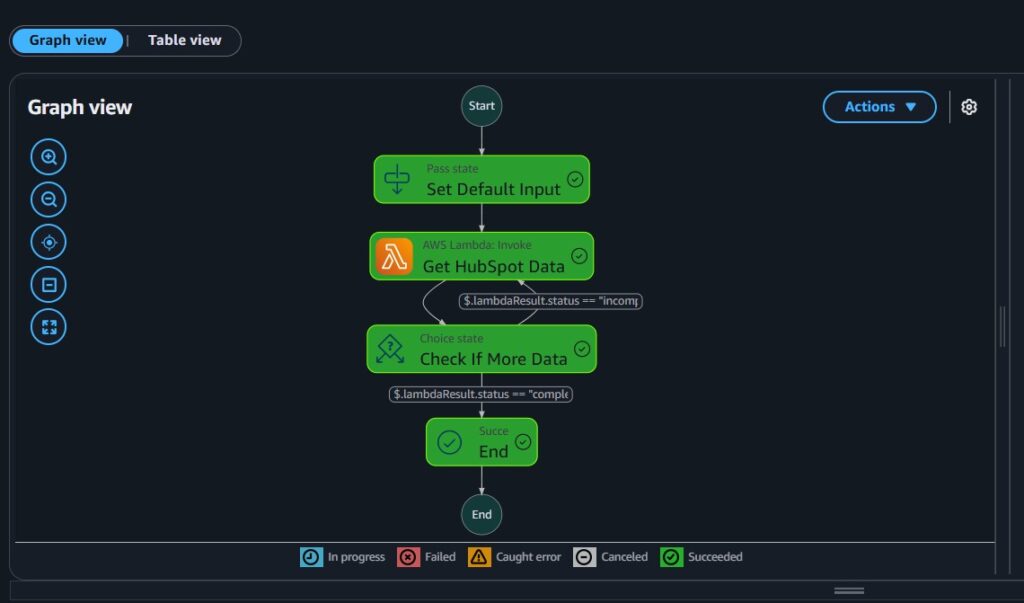
- Visibility — the Step Functions console shows you a visual execution history. You can see exactly where a run succeeded or failed, which offset it was on, and how many iterations it took.
If you’re running this in production, you’ll probably also want monitoring. Setting up Datadog monitoring for Lambda gives you visibility into execution duration, error rates, and cold starts across invocations.
Conclusion
Lambda’s 15-minute timeout is a hard limit you can’t change, but that doesn’t mean you’re stuck. By using Step Functions to orchestrate batched Lambda calls with offset-based pagination, you can process any number of HubSpot records without worrying about timeouts. The pattern is simple, serverless, and scales without you having to manage infrastructure.
If you’re also dealing with HubSpot API reliability issues, check out How to Make Reliable HubSpot API Requests in Python (With Retry Logic). And if your Lambda is running into SQS-related timeout issues too, How to Fix SQS Visibility Timeout in AWS Lambda covers that side of things.