If your GitLab CI/CD pipeline hangs while building a Docker image that installs msodbcsql17, the problem is almost certainly the GPG key import step. The default curl method for retrieving Microsoft’s GPG key is unreliable in CI/CD environments and causes the build to stall indefinitely.
This post shows you the error, why it happens, and how to fix it by switching to wget and gnupg for the key import. You might run into this when building Lambda container images that need MSSQL/ODBC support — like when using PyODBC to connect Lambda to SQL Server.
The Error
The pipeline gets to the GPG key retrieval step and just hangs. In the build logs, you’ll see “ERROR: failed to solve: Canceled: context canceled” or something like this before it times out:
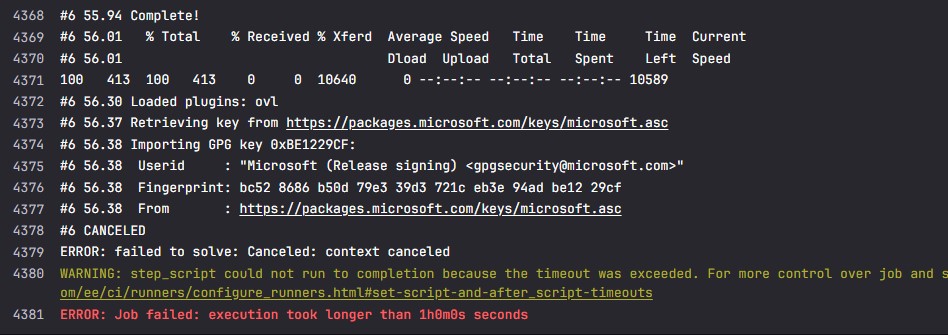
The build never finishes — it just sits there until GitLab’s job timeout kicks in and cancels it.
Why This Happens
When yum installs msodbcsql17, it tries to import Microsoft’s GPG key using its built-in key retrieval. This method relies on curl under the hood, and in CI/CD runner environments, it can hang due to network quirks, certificate issues, or how the runner handles outbound HTTPS requests.
The fix is to download and import the GPG key yourself before yum tries to do it automatically. That way, when yum install msodbcsql17 runs, the key is already trusted and it skips the retrieval step entirely.
The Fix
Replace your existing RUN block with this. The key change is using wget and gnupg to download and install the GPG key manually before running yum install msodbcsql17:
RUN yum update -y && \
    yum install -y \
        gcc gcc-c++ make unixODBC-devel unzip python3-devel curl wget gnupg && \
    wget -qO - https://packages.microsoft.com/keys/microsoft.asc | gpg --dearmor > microsoft.gpg && \
    install -o root -g root -m 644 microsoft.gpg /etc/pki/rpm-gpg/ && \
    curl -sSL https://packages.microsoft.com/config/rhel/7/prod.repo -o /etc/yum.repos.d/msprod.repo && \
    ACCEPT_EULA=Y yum install -y msodbcsql17 && \
    yum clean all && \
    rm -rf /var/cache/yum /var/tmp/* /tmp/*
Here’s what the important lines do:
yum install -y ... wget gnupg— installswgetandgnupgalongside the other build dependencies. These are needed for the manual key import.wget -qO - ... | gpg --dearmor > microsoft.gpg— downloads the Microsoft GPG key and converts it from ASCII-armored format to binary.-qO -tells wget to be quiet and output to stdout.install -o root -g root -m 644 microsoft.gpg /etc/pki/rpm-gpg/— places the key in the RPM GPG keyring directory with correct ownership and permissions (readable by all, writable only by root).curl -sSL ... -o /etc/yum.repos.d/msprod.repo— adds the Microsoft package repository.-sSLmeans silent, show errors, and follow redirects.ACCEPT_EULA=Y yum install -y msodbcsql17— installs the ODBC driver.ACCEPT_EULA=Yis required or the install will prompt and hang in a non-interactive build.yum clean all && rm -rf ...— clears the yum cache and temp files to keep the image size down.
A Note on Lambda Base Images
This Dockerfile uses yum, which means it’s based on Amazon Linux 2 (the Lambda base image for Python 3.8 through 3.11). If you’re using Python 3.12 or later, the Lambda base image uses Amazon Linux 2023, which replaces yum with microdnf. You’ll need to adjust the package manager commands accordingly — see Solve ‘yum: command not found’ in AWS Lambda Python 3.12 base image for that.
Verifying the Fix
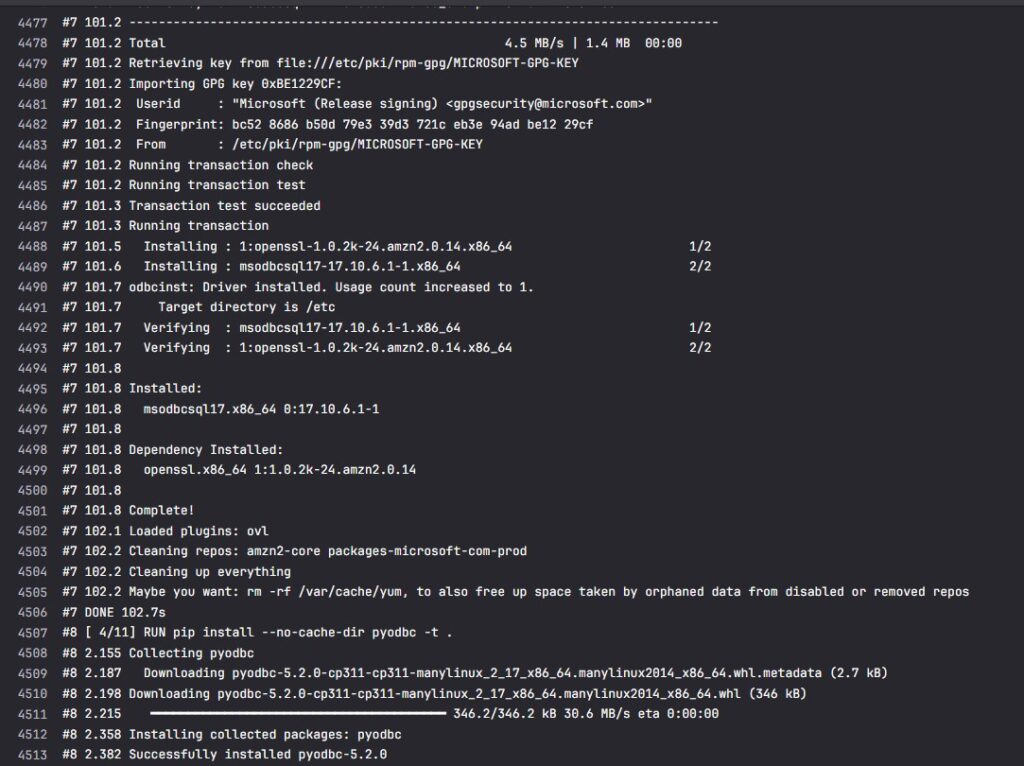
After updating your Dockerfile, push the change and trigger a new pipeline. Watch the build logs — you should see the GPG key import complete without hanging, followed by a successful msodbcsql17 installation. The Docker image should build to completion.
Conclusion
The fix is simple: don’t let yum handle the Microsoft GPG key retrieval itself. Download and install the key manually with wget and gnupg before running yum install msodbcsql17. This avoids the hang that happens when the built-in key import stalls in CI/CD environments.
If you’re also setting up the Lambda function itself to talk to SQL Server, check out Connecting AWS Lambda to Microsoft SQL Server Using PyODBC. For other GitLab CI/CD Docker workflows, see How to Pull Docker Images from Private GitLab Registry with GitLab CI/CD.